The well-known OpenRouter platform, which offers extensive routing options to many different AI models, can guarantee confidential handling of the information sent to a model (and received from it), especially when European regulatory constraints (GDPR, EU AI Act, etc.) apply.
On top of its core feature of routing to different models, OpenRouter offers other very interesting features, such as:
- Processing resilience through a fallback system (in case your primary model fails)
- A model comparison dashboard (performance, cost, speed, etc.)
- Its autonomous agent, Ori, which lets you work with your models on your desktop, in your terminal or in Slack
- A wide selection of models at competitive prices
Let’s see what this platform lets us do in terms of data privacy.
Note: If you would like to suggest an improvement or simply get in touch, you can reach me at contact@lionsec.lu.
Context
You are a Red Teamer about to start a security assessment of an AI system. Your tools, such as Garak, PyRIT, Promptfoo or DeepTeam, are ready to go. Your API key and adversarial model are configured, but one detail remains, and not a minor one: regarding data that you and your tools will send to the target model, and receive from it; do you know if it will be handled in line with the applicable standards and regulations?
Note: If you are an organisation about to have a Red Team assessment of your AI system carried out, don’t forget to check that your auditors, internal or external, guarantee the confidentiality of your data!
There are indeed several things to consider:
- Information routing: which servers do your requests go through? In which regions? How can you be sure?
- What you send: your know-how, sensitive information provided by your client before the assessment, your tools that rely on an adversarial model (multi-turn attacks, encoders, scorers, etc.)
- What you receive: did your attacks make a model give in and bypass its guardrails? (For example, a RAG system revealing the credentials of the database it pulls its information from, or PII extraction.)
- What the model host actually does with your data: does it keep it? If so, for how long? Does it use it to train its models?
Note: As stated in its documentation, OpenRouter does not store its users’ prompts or responses unless they explicitly opt in.
All of these questions deserve answers in order to protect your clients’ data, and this article will try to shed some light on them.
Data privacy
Let’s go through each of the points above and see how to address them.
Note: Routing data within the EU requires OpenRouter’s Business or Enterprise plans, which charge a fee when you add credits.
Data routing
By default, OpenRouter routes requests through the global domain https://openrouter.ai/api/v1/chat/completions.
To make requests go only through routes located in the EU, to models hosted in that same region, you need to use the regional domain https://eu.openrouter.ai/api/v1/chat/completions (for the United States: https://us.openrouter.ai/api/v1/chat/completions).
To test it with cURL in the EU region:
curl https://eu.openrouter.ai/api/v1/chat/completions \
  -H "Authorization: Bearer <OPENROUTER_API_KEY>" \
  -H "Content-Type: application/json" \
  -d '{
    "model": "anthropic/claude-sonnet-5",
    "messages": [{"role": "user", "content": "Hello"}]
  }'
To get the full list of models available in the EU: https://openrouter.ai/models?region=eu
Without a suitable plan, you should get an error message.
Note: When no endpoint in the region is able to respond, OpenRouter returns an error message rather than trying to route the request outside the region.
Enforcing EU routing with guardrails
Knowing how to use the right OpenRouter URL is one thing, but nobody is immune to a slip-up. You can therefore enforce routing using the guardrails provided by OpenRouter.
To do so, log in to the OpenRouter platform and go to your dashboard. Select the Workspace -> Guardrails -> Workspace Guardrail menu, then Model & Provider Access.
Next, enable the Restrict data regions option and untick Global and United States:
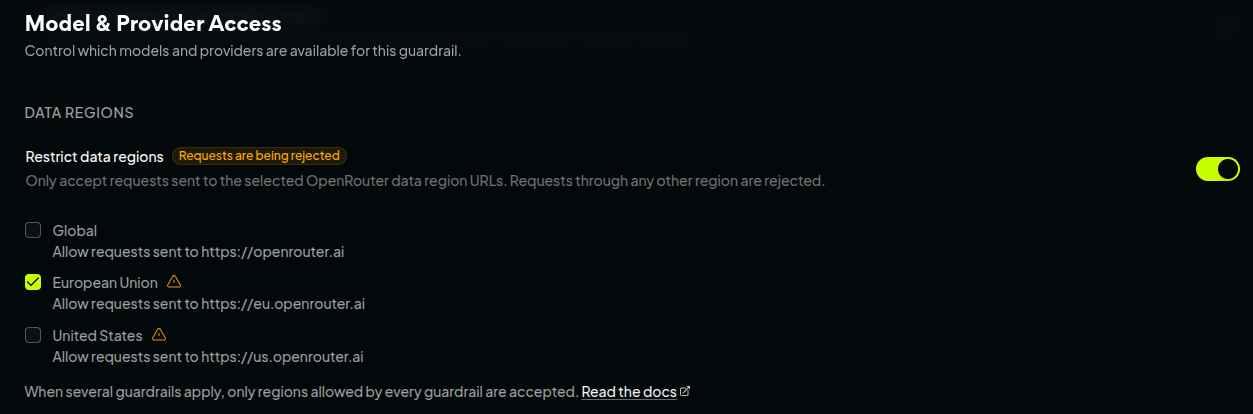
Requests sent through any domain other than https://eu.openrouter.ai are then rejected.
Note: You can also apply this same guardrail to your whole account (all your workspaces will be affected), but here we focus on a single workspace as an example.
With routing configured, let’s move on to the model providers’ retention policy.
Retention policy with ZDR
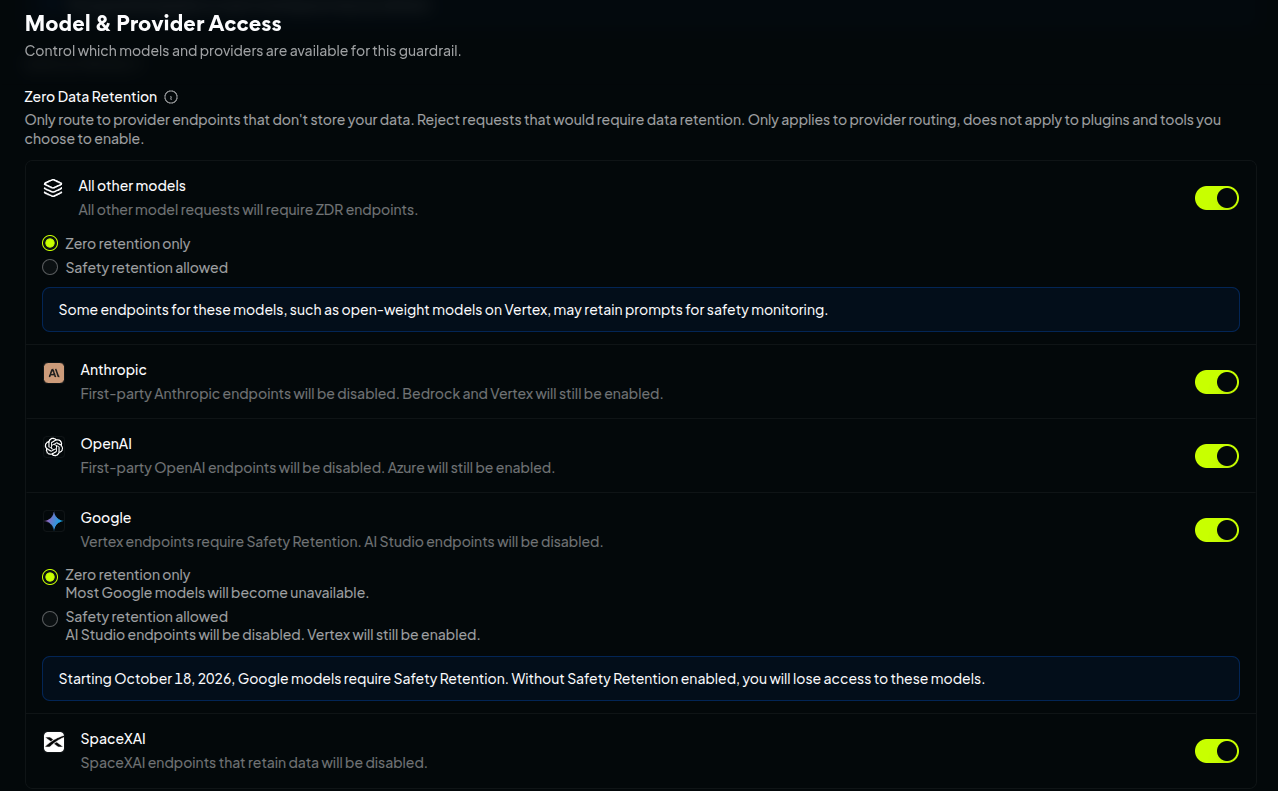
On the same page, we find the Zero Data Retention menu. This feature guarantees that no data is kept by the model provider once a request has been processed. OpenRouter works directly with model providers and makes sure their policies comply with ZDR.
As shown below, simply select the model groups you want to use (here, we select all of them as an example), then, when offered, choose Zero retention only:
You can also enable ZDR on a per-request basis, in the body of the POST request:
{
  "model": "meta-llama/llama-3.3-70b-instruct",
  "messages": [{ "role": "user", "content": "Hello" }],
  "provider": {
    "zdr": true
  }
}
Note: After enabling ZDR for all groups, the bottom of the page shows the number of eligible providers dropping from 96 to 66, and the number of models from 656 to 359 (at the time of writing). The selection shrinks even further once EU routing is enabled.
Data collection
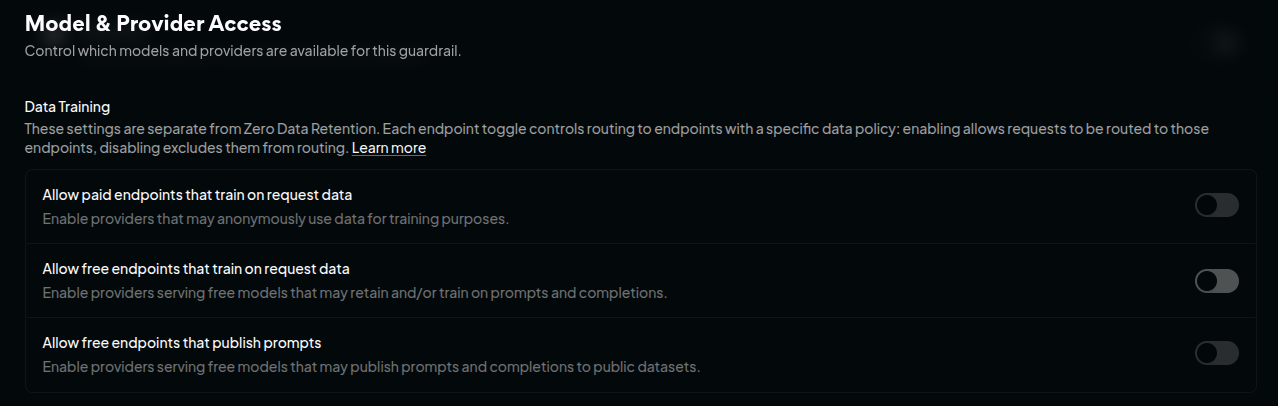
Still on the same page, the Data Training menu lets you define which endpoints may or may not train their models on your data (or even publish your prompts in public datasets).
For the strictest possible guardrail policy, disable all three options, especially Allow free endpoints that train on request data if you use your Red Team tools with a free model:
As with ZDR, data collection can be explicitly denied in the body of the POST request:
{
  "provider": {
    "data_collection": "deny"
  }
}
At this point, you have a data privacy policy for the EU region: you know how your data is routed and what the model provider can and cannot do with it.
Model whitelisting
One last interesting point is to restrict the models your tools can use through the OpenRouter API key. On the same page, in the Access Policy menu, simply open the Restriction Mode list and choose Only Allow…. Here, we chose the Mistral provider and its Mistral Large 4 model:
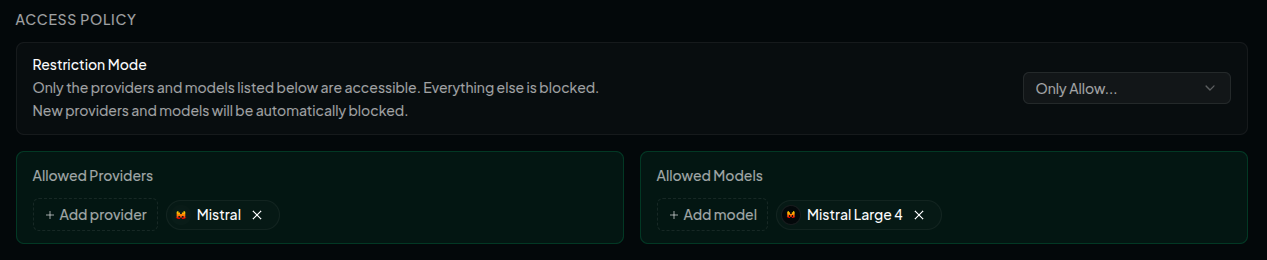
This setting completes the list of options to configure in order to guarantee data privacy in the EU. Once again, they can be applied to your whole account or to a specific workspace.
Choosing an adversarial model
Once all these options are set, we can see that the list of eligible providers and models at the bottom of the page has… shrunk drastically. There are nevertheless still several interesting choices left (and if you have your own infrastructure, even better!). A sensible choice is to find the right balance between token cost and the model’s guardrail level: some models are more permissive than others, and you don’t want your attack prompts to be blocked!
There are several ways to go about it:
- Look at benchmarks such as the UGI Leaderboard on Hugging Face
- Run tests directly and compare the results (once again, several models can be called with the same API key, that’s the magic of OpenRouter!)
- Jailbreak a model yourself
- Ask the community for advice or discuss it with your peers :)
Pre-assessment checklist
To sum up everything we have just covered, here are the checks to perform before the assessment:
- Use the EU regional domain
- Restrict the allowed regions with a guardrail
- Enable ZDR
- Deny training on your data
- [Optional] - Restrict the allowed models
- Attack!
Conclusion
Just as in traditional cybersecurity, we have seen that data privacy is essential: before using the most popular tools of the moment, you need to make sure you know what happens to the data you handle. The OpenRouter platform offers various ways to control data flows at several levels, and they should be applied in order to meet your clients’ requirements.
Links
- Official OpenRouter website
- OpenRouter model rankings
- OpenRouter’s Ori agent page
- OpenRouter plans and pricing
- List of models available in the EU on OpenRouter
- UGI Leaderboard on Hugging Face
- Official Garak website
- Official PyRIT website
- Official Promptfoo website
- Official DeepTeam website
- A Practical Guide to Garak
- A Practical Guide to the PyRIT Scanner
- A Practical Guide to the PyRIT Framework
Contact
For any suggestions or simply to get in touch: contact@lionsec.lu.